
Did you know shipping software is always a balancing act? Yes, every development team faces pressure. Wondering what? Pushing out features faster while keeping bugs out of production, maintaining reliability and also keeping users happy.
As apps grow more complex and release cycles shrink down to weeks or even days. Picking the right testing strategy is not just a technical detail. But a major decision.
So, how do you handle it? Do you pour money into QA automation or stick to trusted manual testing?
Truthfully, the debate between automation and manual testing always boils down to a few constraints. What your app actually does, how often you release, your current budget, and how much time you want to spend maintaining tests down the road.
Let’s break down the advantages, hidden costs, and real-world implications of both methods so you can build a quality strategy that actually works for your team.
What Is QA Automation Testing?
Quality automation ditches human clicking in favor of code. Engineers write specialized scripts and use testing frameworks to interact with the application automatically, comparing what actually happens on screen against what should happen.
Picture that same financial app where users log in, move money around, and download statements. Instead of having a tester repeat those steps fifty times a day, an automated script can:
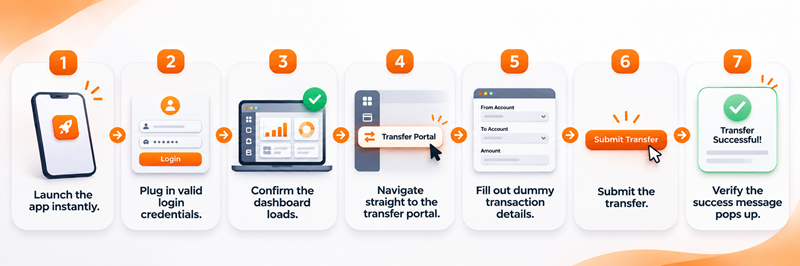
- Launch the app instantly.
- Plug in valid login credentials.
- Confirm the dashboard loads.
- Navigate straight to the transfer portal.
- Fill out dummy transaction details.
- Submit the transfer.
- Verify the success message pops up.
The best part? That exact sequence can run smoothly across multiple environments, operating systems and browsers while your team sleeps.
Common Types of Automation Testing
- Regression Testing: Making sure a new code deploy did not accidentally break an old feature.
- Functional Automation: Automatically confirming core features pass their requirements.
- API Testing: Testing backend communication, data handling, and payload responses behind the scenes.
- Integration Testing: Ensuring different modules and third-party services talk to each other nicely.
- Cross-Browser Testing: Firing up automated checks across Chrome, Safari, Firefox, and Edge simultaneously.
- Performance Testing: Stress-testing the app under heavy simulated user loads to see where it cracks.

What Is Manual Testing?
Manual testing is the process where QA professionals click through the application without relying on scripts. They test workflows, hunt down edge cases, and judge whether the overall experience feels right.
Instead of just checking if a box turns green, a tester can spot when a UI element feels clunky, awkward or unintuitive.
You simply cannot script empathy or gut feeling. That’s why manual testing shines whenever an application needs a human eye.
A manual tester will naturally follow these steps:
- Click around different product categories just like a normal shopper.
- Throw items into the shopping cart.
- Try applying weird or expired discount codes to see how the system reacts.
- Walk completely through the payment gateway.
- Verify that confirmation emails actually look correct.
- Switch over to a mobile browser to check responsiveness.
- Catch jarring layout shifts or confusing error messages.
The Core Types of Manual Testing
- Exploratory Testing: Testers dive into the app with open minds. They do not have rigid scripts and the mission to break things. It’s amazing for uncovering weird edge cases that structured test plans miss entirely.
- Usability Testing: This is all about human friction. How easy is it to navigate? Can someone with accessibility needs use it? Does the interface make sense?
- Functional Testing: Verifying that individual features actually do what the product requirements demand.
- User Acceptance Testing (UAT): The final checkpoint where stakeholders or real users test drive the application to sign off before release.
- Ad Hoc Testing: Quick, unstructured checks done on the fly when someone wants to poke around a newly built feature.
Popular QA Automation Tools At a Glance
Manual vs. Automation: Head-to-Head Differences
It’s easy to think the only difference is who (or what) is clicking the buttons, but the ripple effects touch everything from your budget to your release velocity.
The Good and Bad of Manual Testing
Why We Still Need Manual Testing
- Human Context and Empathy: Only a human can tell you if a workflow feels frustrating or if a button placement is annoying.
- Agility in Exploratory Work: If a tester spots something weird halfway through a test, they can immediately pivot and dig deeper.
- Zero Upfront Setup Costs: You don’t need an automation architect to get started; you just need a tester with a plan.
- Flexible With Shifting Requirements: When UI elements change daily during early startup phases, you aren’t constantly rewriting broken test scripts.
Where Manual Testing Falls Short
- It’s Slow and Tedious: Running the same checklist after every single code commit burns hours of valuable time.
- Human Error is Inevitable: People get tired, miss steps, or overlook subtle visual bugs.
- Poor Scalability: As your product grows, keeping up manually means linearly adding more testers.
- CI/CD Bottlenecks: Modern development moves too fast for manual regression testing to keep pace without delaying deployments.
The Good and Bad of Automation Testing
Why Teams Fall in Love with Automation
- Blazing Fast Feedback: Run hundreds of regression tests in minutes right inside your CI/CD pipeline.
- Unwavering Consistency: Scripts don’t get bored or skip steps. They execute the exact same instructions every single time.
- CI/CD Integration: Tests can run automatically every time a developer creates a pull request, catching bugs before they hit staging.
- True Scalability: Spin up parallel execution across multiple cloud environments to validate massive suites effortlessly.
Where Automation Can Pain You
- High Initial Price Tag: Building a clean, reliable framework takes senior engineering talent, infrastructure, and time.
- Ongoing Maintenance: When developers change a class name or redesign a page layout, automated tests break. Unmaintained test suites quickly turn into a messy liability.
- Zero Intuition: A script will never look at a screen and say, “That looks weird, even though it technically passes.”
- False Security: Writing bad automated tests just means you’re automating bugs or wasting time on brittle checks that pass or fail randomly.
The Real Cost Breakdown: An Example
Let’s look at the numbers. Imagine a mid-sized SaaS company running a regression suite after every release.
- Test Suite Size: 100 test cases
- Manual Run Time: 10 minutes per test (~16.7 hours total)
- Release Frequency: 4 times a month
- Average QA Labor Cost: $40 / hour
The Manual Route:
- 16.7 hours × 4 releases = ~66.7 hours monthly.
- 66.7 hours × $40/hr = $2,667 per month.
The Automated Route:
- Upfront framework and script creation investment: $12,000.
- Automated run time: 2 hours per release (8 hours total monthly = $320).
- Maintenance and infrastructure: ~$400 monthly.
- Total monthly automated operating cost: $720.
In this scenario, automation saves roughly $1,947 every month, paying off the initial $12,000 investment in just over six months. Note: Every project is different, but the math illustrates why mature products heavily favor automation for repetitive suites.

When Should You Choose Manual Testing?
Don’t automate everything just because it sounds cool. Stick to manual testing when:
- You’re building an MVP: Early-stage code changes hourly. Automating too early means rewriting scripts constantly.
- Evaluating UX and Design: Visual polish, micro-interactions, and subjective user feelings require a human touch.
- Exploratory Testing: When you are searching for unknown bugs or seeing how an app reacts to erratic user behavior.
- One-Off Projects: Short-term campaigns or small features where automation overhead outweighs the benefits.
When Should You Jump Into Automation?
Invest in automation when:
- Releases Are Frequent: If you deploy weekly or daily, manual regression is a recipe for burnout.
- Your Test Suite Is Massive: Hundreds of repetitive checks will crush a manual team over time.
- Cross-Browser & API Work: Validating complex backend payloads and multi-browser rendering is what computers do best.
- You Run a CI/CD Pipeline: You want automated sanity checks running every time code gets merged.
The Smart Move: The Hybrid Approach
Most successful tech companies don’t choose one over the other—they blend them.
Think of it as a division of labor: let automation handle the boring, repetitive, high-frequency grunt work (regression suites, API health checks, cross-browser validation), and let your human QA engineers focus on exploratory testing, complex er journeys, and UX polish.
By strategically splitting duties, you protect release speed without sacrificing product quality.