The PHP security community has had a serious reason to sound the alarm.
On October 21, 2026, two critical vulnerabilities, dubbed PHP2Shell, were disclosed in the PHP runtime. Tracked as CVE-2026-109618 and CVE-2026-109619, these flaws could allow unauthenticated attackers to execute code remotely on affected systems.
The concern extends beyond PHP itself. WordPress, Drupal, and Joomla rely on PHP, and security researchers have demonstrated exploits against products using the vulnerable runtime. With proof-of-concept exploits circulating, leaving affected installations unpatched can expose businesses to significant risk.
For organizations running websites on older PHP versions, this development raises an important question: Is your application running a supported, patched version of PHP?
This guide explains the risks of outdated PHP, how to check your current version, and how to upgrade safely. It also explores when a routine upgrade is enough and when legacy application modernization deserves consideration.
Why Does Your PHP Version Matters Right Now?
Nowadays, PHP version management is not just a matter of routine maintenance. Your choice will affect the speed of bug fixing, maintenance, and adjustment of your application according to development changes.
What is crucial to understand here is the difference between using the new version of PHP and using the supported one. There is a possibility that your application continues working with a particular version even after it becomes unsupported.
Nonetheless, it doesn’t mean that any further security patches for the new vulnerabilities will be developed. Each PHP version has a set support cycle which consists of two years of full support and two years of support limited to only security patches.
Which PHP Versions Are Still Supported?
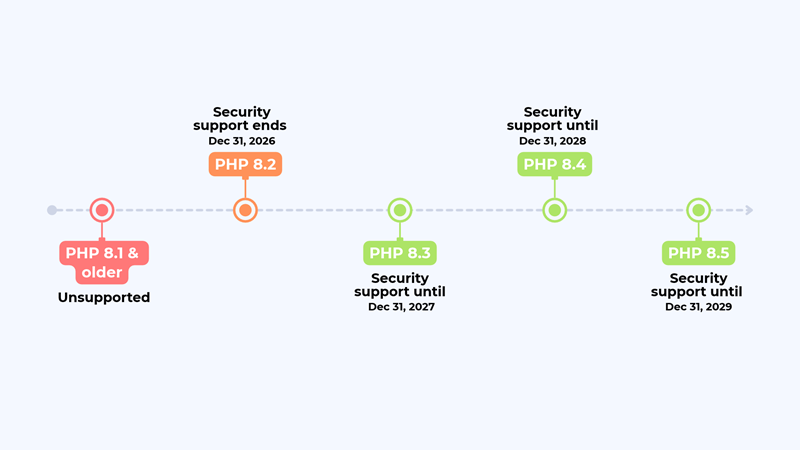
As of October 2026, PHP’s official support schedule lists the following security-support deadlines.
PHP 8.2 deserves particular attention because its security-support deadline is approaching. Businesses still using it should assess their upgrade options now rather than wait until support expires.
PHP 8.4 and 8.5 offer longer support windows, but the newest version isn’t automatically the best choice for every application. Framework compatibility, third-party packages, hosting configuration, and automated test coverage all influence the right upgrade target.
Recent PHP Security Updates Show Why Patching Matters
The October 21, 2026, PHP security releases provide a timely example of why version management matters. The PHP development team disclosed two critical remote code execution vulnerabilities, CVE-2026-109618 and CVE-2026-109619. Both can allow unauthenticated attackers to execute code on vulnerable PHP installations.
According to the official PHP advisory, the vulnerabilities involve memory handling during exceptional conditions. One concerns out-of-memory error handling; the other involves stale global state referencing freed memory. These are runtime-level flaws, not simply application code errors.
The affected PHP branches received security releases, including PHP 8.2.35, 8.3.36, 8.4.27, and 8.5.12. Administrators should verify their deployed version and install the appropriate security update.
Read the Palo Alto Networks advisory for CVE-2026-109618 for its product-specific impact assessment. The advisory also discusses CVE-2026-109619, so it provides useful context for understanding the broader security issue.
The takeaway for businesses: security isn’t a one-time upgrade project. It requires ongoing patch management, dependency reviews, and a clear plan for retiring unsupported software.
For WordPress sites and custom PHP applications alike, check the runtime version actually serving web requests. Then confirm that the application, framework, and hosting environment support the security updates you plan to deploy.
What Could Go Wrong With an Outdated PHP Version?
Even if your website is not yet crashing, an outdated PHP version could cause various problems for you way before that.
The issues could be different based on your application, hosting environment, and other factors. But there are three aspects that you should look out for.
Security vulnerabilities
This is the big one. When someone finds a flaw in an end-of-life PHP version, no official fix is coming. How exposed you are depends on the flaw and on how your application is set up, but you have lost the most basic defense there is : patching.
A compromised site can mean malicious redirects, injected scripts, leaked customer data, unauthorized admin access or simply being knocked offline. Not every outdated site gets hacked. The ones that do are usually expensive to clean up.
One caveat: if your site has already been compromised, upgrading PHP won’t undo the damage. You’ll also need a malware scan, code cleanup, password and key resets, and a wider security review.
Compatibility problems
Old PHP versions slowly get cut off from the rest of the ecosystem. New plugin releases drop support for them. Libraries move on. Payment gateways and third-party APIs update their SDKs.
It cuts the other way too. A custom application built years ago may rely on functions that newer PHP versions have deprecated or removed. Upgrade without checking, and a contact form, checkout, login or database query can fail without much warning.
That’s why dependencies need to be reviewed and tested before the upgrade, not discovered on the live site afterward.
Rising maintenance costs
Legacy PHP applications get harder to work on every year. Developers spend hours working around old libraries, undocumented code and unsupported servers. Small changes take longer than they should, and a quick fix in one place breaks something in another. Finding developers who know an obsolete framework gets harder too.
Yes, an upgrade costs money up front. Staying put costs money as well. It just arrives later, as emergency fixes, downtime and features you can’t ship.

How to Check Which PHP Version You’re Running
Before planning a PHP upgrade, find out which version your website actually uses. Checking the wrong environment can create a false sense of security, especially when command-line tools and live web servers run different PHP versions.
The process depends on whether you’re managing WordPress, a custom PHP application, or a website hosted across multiple environments.
Check the PHP Version on WordPress
If your website runs on WordPress, you can usually find its PHP version without accessing the server directly.
- Log in to your WordPress dashboard.
- Navigate to Tools → Site Health.
- Open the Info tab.
- Expand the Server section.
- Look for the PHP version listed in the server information.
- You can also check your hosting control panel. Many providers display the PHP version assigned to each domain and allow you to change it.
However, don’t switch versions immediately just because an update is available. First, confirm that your WordPress version, active theme, plugins, and custom code support the intended PHP release.
Check the PHP Version on a Custom Application
For a custom PHP application, you can check the command-line version by running this command in your server terminal:
The output displays the installed PHP CLI version, along with its build information.
There’s an important limitation, though. The PHP CLI version may differ from the version handling your website’s HTTP requests. Your server might use PHP-FPM, Apache’s PHP module or another configuration for web traffic.
To verify the live runtime, inspect your web server and PHP-FPM configuration, or check with your hosting provider. If you use a managed hosting platform, its domain or runtime settings may show the version serving the application.
Avoid leaving a publicly accessible phpinfo() page on a production server. It can expose configuration details that attackers may find useful.
Check Every Environment, Not Just Production
Many businesses maintain separate development, staging, and production environments. Larger applications may also run across multiple web servers or containers.
These environments can drift apart over time. One server might receive a PHP update while another continues running an older runtime. That inconsistency can cause unexpected behaviour during deployments.
Before planning an upgrade, verify:
- PHP runtime: Confirm the version used by each web server or container.
- Framework and dependencies: Check compatibility with the target PHP release.
- Extensions: Review required extensions, database drivers, and their versions.
- Configuration: Compare relevant PHP settings across environments.
- Deployment processes: Confirm that future releases will use the intended runtime consistently.
This inventory gives your development team a reliable starting point for assessing compatibility and planning the upgrade.
Once you’ve confirmed the current version, compare it with the official PHP supported versions schedule. If your runtime is approaching end of life, start planning the next step before security support expires.
The key is simple: verify first, assess compatibility second, and upgrade only after testing the application properly.
PHP Upgrade or Application Modernization: Which Do You Need?
An outdated PHP version doesn’t automatically mean your application needs a complete rebuild. Sometimes, upgrading the runtime and updating a few dependencies is enough. In other cases, deeper architectural problems make application modernization the more practical investment.
The right decision depends on your codebase, technical debt, integration requirements, and future business goals.
PHP Version Upgrade: When Is It Enough?
A PHP version upgrade moves your application from an older runtime to a supported release. The process typically involves checking compatibility, updating dependencies, resolving deprecated functionality, and testing critical workflows.
This approach makes sense when:
- Your existing application architecture remains maintainable.
- Your framework and essential libraries support the target PHP version.
- Your application meets current business requirements.
- Compatibility issues can be resolved without extensive restructuring.
For example, an ecommerce website built on a maintained PHP framework may need dependency updates and regression testing before moving to a newer runtime. Rebuilding the entire platform would add unnecessary cost if the existing architecture still works well.
Code Refactoring: When Does Legacy Code Need Attention?
Sometimes, the runtime isn’t the biggest problem. The application may contain duplicated logic, tightly coupled components, inconsistent coding patterns, or functions that are difficult to test.
Code refactoring improves the internal structure without intentionally changing the application’s existing behaviour.
It can help when developers repeatedly encounter the same defects, struggle to introduce changes, or spend excessive time understanding interconnected modules.
Refactoring can also make a PHP upgrade safer. Simplifying complex code and adding automated tests before changing the runtime reduces the likelihood of introducing regressions.
Legacy PHP Application Modernization: When Is a Broader Approach Better?
Application modernization addresses problems that extend beyond the PHP version. It may involve updating frameworks, replacing unsupported dependencies, improving architecture, introducing APIs, or separating tightly coupled components.
Consider a business application that processes orders, manages customer records, and connects with several external systems. If every new integration requires custom workarounds, upgrading PHP alone won’t solve the underlying architectural limitations.
A phased modernization strategy can address the most urgent problems first while preserving business-critical functionality.
Possible improvements include:
- Replacing abandoned libraries with maintained alternatives.
- Separating business logic into more manageable modules.
- Introducing API-based integrations where appropriate.
- Improving automated testing and deployment pipelines.
- Moving selected components to independently deployable services when justified.
Modernization doesn’t automatically require microservices or a new technology stack. The architecture should follow actual business and technical needs.
PHP Migration or Full Redevelopment: When Should You Consider It?
Migration or redevelopment becomes relevant when the existing platform cannot reasonably support future requirements.
Your application may depend on an obsolete framework, lack maintainable documentation, or struggle with scaling and integration demands. In such cases, continuing to patch the existing codebase may become more expensive than transitioning to a new architecture.
However, moving to another language isn’t a modernization strategy by itself.
For example, migrating from PHP to Node.js or Python may make sense when the team’s capabilities, integration requirements, performance characteristics, or architectural goals justify the change. Each option still requires security planning, compatibility analysis, testing, and a migration strategy.
React is different. It is a frontend JavaScript library, not a direct replacement for PHP’s backend capabilities. A React interface can work with a PHP, Node.js, or Python backend through APIs.
Which Approach Fits Your Application?
The decision should follow a technical assessment, not the PHP version number alone. Evaluate security exposure, dependency compatibility, code quality, operational constraints, and the application’s expected lifespan before committing to a particular approach.
For businesses weighing these options, SoftProdigy’s application engineering services can be a relevant starting point for exploring an upgrade or modernization strategy.
How to Upgrade PHP Without Breaking Your Website
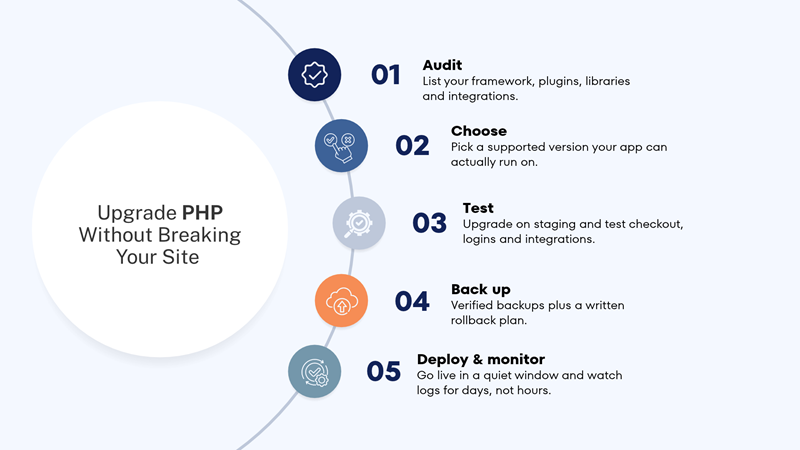
Switching the PHP version straight on a live server and hoping for the best is how websites go down on a Friday afternoon. Here’s a safer way to do it.
- Audit the application and its dependencies: Start by listing what you have: the current PHP version, framework, libraries, database drivers, server configuration and third-party integrations. For WordPress, that means every theme, plugin, custom code snippet and business-critical integration. For custom applications, check your Composer dependencies and confirm each package supports the PHP version you’re moving to.This audit tells you how big the job really is, and which pieces need updating, replacing or rewriting.
- Pick a supported target version: The newest release isn’t automatically the right one. If your framework or a key library doesn’t support PHP 8.5 yet, 8.4 may be the smarter move.Aim for a version that’s supported for a good while, works with your host, and that your application can actually run on.
- Test everything on staging first: Set up a staging copy that mirrors production as closely as possible, apply the PHP update there, and test the journeys that matter to the business. For an online store, that means browsing products, creating an account, checking out, taking a payment and sending order emails. For a business application, focus on logins, reports, data processing and integrations with other systems.Automated tests are great for catching regressions. Still, have a person walk through the critical workflows, especially the ones your tests don’t cover.
- Back up and plan your rollback: Take a verified backup of the database, application files, server configuration and environment settings. Then write down exactly how you’d roll back if something serious goes wrong, and who would do it.
- Deploy and keep watching: Once testing passes, schedule the production deployment for a quiet period. Afterward, keep an eye on error logs, performance, server resources and key transactions.Don’t stop after the first hour. Some problems only appear later, when a scheduled job runs or a monthly report gets generated.
When Should You Modernize a Legacy PHP Application?
A PHP upgrade can resolve runtime compatibility and security issues, but it won’t automatically fix an application that’s difficult to maintain. If every new feature requires workarounds, integrations keep breaking, or developers struggle to change existing code, the problem may run deeper than the PHP version.
Legacy PHP application modernization makes sense when the application’s architecture, dependencies, or development practices prevent it from meeting current business needs.
5 Signs Your PHP Application Needs Modernization
- Simple changes require disproportionate effort: Adding a new payment method or modifying a customer workflow shouldn’t require rewriting unrelated modules. If components depend heavily on one another, even small changes can trigger unexpected regressions.This often indicates tightly coupled code, insufficient test coverage, or outdated architectural patterns.
- Critical dependencies no longer receive maintenance: Applications built on abandoned frameworks, unsupported libraries, or outdated database drivers become increasingly difficult to secure and maintain. Replacing these dependencies may require more than updating a package. Teams may need to refactor application code or migrate functionality to supported alternatives.
- Integrations require constant workarounds: Modern business applications often connect with CRMs, payment gateways, analytics platforms, and internal enterprise systems. When every new integration requires custom patches, the application’s architecture may need clearer interfaces or an API-based integration layer.
- Performance and scalability are becoming bottlenecks: Slow database queries, inefficient caching, resource-heavy processes, and poorly structured application logic can limit performance as traffic grows. Modernization can address these issues through query optimization, caching improvements, background processing, and architectural changes where justified. Simply switching PHP versions won’t resolve every performance bottleneck.
- The application cannot support future business requirements: Your business may need new digital channels, better reporting, automated workflows, or integrations with newer platforms.If the existing application cannot support these requirements without extensive workarounds, modernization can create a more adaptable technical foundation.
How to Modernize PHP Applications Without Rebuilding Everything
Modernization doesn’t have to mean abandoning a working application. A phased strategy lets businesses address high-priority risks while preserving valuable functionality.
A practical roadmap might include:
- Upgrade the PHP runtime: Move to a supported version after assessing compatibility.
- Replace unsupported dependencies: Remove abandoned packages and address known vulnerabilities.
- Refactor high-risk modules: Simplify complex code and introduce appropriate automated tests.
- Improve integration architecture: Introduce APIs where they reduce coupling and simplify communication.
- Modernize incrementally: Replace individual components when there is a clear technical or business justification.
- For example, an established ecommerce platform might retain its existing PHP backend while introducing a better integration layer and improving its checkout module. This approach can reduce technical debt without requiring an immediate platform-wide rewrite.
The key is prioritization. Start with security exposure, operational risk, and business-critical functionality rather than modernizing every component at once.
SoftProdigy’s application engineering services can be a relevant starting point for businesses evaluating their upgrade and modernization options.
Does Moving from PHP to React Make Sense?
If your PHP application feels outdated, switching to React might seem like the obvious next step. React powers modern web interfaces, supports interactive user experiences, and works well with many contemporary frontend architectures.
But there’s an important distinction to understand before planning a migration: PHP and React solve different problems.
PHP is a server-side programming language commonly used for backend logic, database interactions, authentication, and business workflows. React is a JavaScript library for building user interfaces. Replacing PHP with React alone won’t replace the backend functionality your application depends on.
The better question is whether your existing backend needs an upgrade, a new frontend, or a different backend architecture altogether.
PHP vs. Node.js vs. Python: Which Backend Technology Should You Choose?
If your goal is to replace an outdated PHP backend, the more relevant comparison is with other backend technologies, such as Node.js and Python.
Each option has strengths, and the right choice depends on your application’s workload, existing architecture, team expertise, and long-term requirements
PHP remains a practical choice for many business applications. A well-maintained PHP application may need a runtime upgrade rather than a complete migration. Its suitability depends on the framework, architecture, dependencies, and workload.
Node.js can suit applications built around JavaScript or TypeScript. Its event-driven, non-blocking I/O model can work well for APIs and applications handling many concurrent connections. CPU-intensive operations still require appropriate architectural decisions.
Python can suit applications involving data processing, automation, and machine learning integrations. Frameworks such as FastAPI and Django support different application architectures, but performance and scalability still depend on implementation and infrastructure.
No language automatically makes an application more secure or scalable. Those outcomes depend on coding practices, dependency management, architecture, testing, and ongoing maintenance.
When Should You Keep PHP and Introduce React?
Keeping PHP while adding React can make sense when the backend remains reliable but the frontend needs a substantial improvement.
Consider this approach when:
- Your existing business logic and database integrations work reliably.
- Users need a more interactive interface.
- Your application can expose suitable APIs.
- Your team can support a separate frontend architecture.
- The expected benefits justify the additional development and maintenance effort.
A headless WordPress architecture is one example. WordPress can continue managing content while a separate React frontend presents it to visitors through APIs.
However, introducing React also brings additional considerations, including rendering strategy, accessibility, routing, caching, deployment, and search engine optimization. Server-side rendering or static generation may help with discoverability, depending on the implementation.
When Does a Backend Migration Make More Sense?
A move from PHP to Node.js or Python deserves consideration when there is a clear architectural or business reason.
For example, a business might want to standardize several services around an existing TypeScript ecosystem. Another might need a Python-based data-processing service that integrates with its broader analytics infrastructure.
Even then, replacing the entire backend may be unnecessary. A gradual approach can introduce new services alongside the existing PHP application, allowing teams to migrate specific capabilities when justified.
This incremental strategy requires careful API design, authentication controls, data consistency planning, and monitoring. Without those safeguards, a multi-language architecture can increase complexity rather than reduce it.
Before choosing a new stack, evaluate the existing codebase, integration requirements, expected workloads, team capabilities, and total cost of ownership. SoftProdigy’s application engineering services can be a relevant starting point for exploring these architectural decisions.
The bottom line: React is a frontend option, while PHP, Node.js, and Python can serve backend roles. Choose the technology that solves your actual problem, rather than migrating simply because another stack is trending.
How Much Does PHP Application Modernization Cost?
PHP application modernization costs vary depending on the application’s condition, technical complexity, and business requirements. A website running on a maintained framework may need only a runtime upgrade and dependency updates. A legacy enterprise application with undocumented code and multiple integrations may require extensive refactoring and phased migration.
The key is understanding what needs fixing before committing to a budget.
What Influences PHP Modernization Costs?
Several technical and operational factors determine the scope of a modernization project.
- Application size and code quality
A small application with clean, well-documented code is generally easier to upgrade than a large system with tightly coupled modules. Poor documentation and accumulated technical debt can increase discovery, testing, and refactoring effort.
- Dependency and framework compatibility
Unsupported frameworks, abandoned libraries, and incompatible PHP extensions may require replacement or significant code changes. The more dependencies an application has, the more carefully teams must assess compatibility.
- Testing requirements
Applications with automated test coverage are often easier to validate during upgrades. When tests are missing, teams may need additional manual testing and new regression tests to protect critical workflows.
- Database and third-party integrations
Complex database schemas, payment gateways, CRM systems, and external APIs can increase implementation and testing effort. Each integration must continue working reliably after the upgrade.
- Infrastructure and deployment requirements
Hosting changes, container configuration, CI/CD pipelines, monitoring, and rollback requirements can influence the overall project scope. Applications that require near-continuous availability may also need phased deployments.
- Business continuity requirements
The cost of downtime differs across businesses. An informational website may tolerate a short maintenance window, while an ecommerce platform or business-critical application may require more extensive deployment planning.
How SoftProdigy Can Help With PHP Upgrades and Application Modernization
Upgrading an outdated PHP application starts with understanding what needs to change and what already works. Without that clarity, businesses risk spending money on unnecessary redevelopment or overlooking compatibility issues that could disrupt operations.
SoftProdigy helps businesses evaluate their existing applications, identify technical risks, and plan practical modernization strategies aligned with their business requirements.
From PHP Upgrade to Long-Term Application Modernization
Depending on your application’s condition, the right approach may involve a targeted upgrade or a broader engineering initiative.
- PHP version upgrades: Assess runtime compatibility and plan transitions to supported PHP releases.
- Legacy application modernization: Identify outdated dependencies, complex code, and architectural limitations that affect maintainability.
- Application refactoring: Improve code structure and testability while preserving existing business functionality.
- API development and integration: Connect legacy applications with modern platforms and business systems.
- Technology migration: Evaluate alternative backend technologies when the existing architecture no longer meets business needs.
The objective isn’t to replace technology simply because something newer exists. It’s to create a more secure, maintainable application that can support future business requirements.
Start With a Clear Modernization Roadmap
Before committing to a major upgrade or migration, understand your application’s current limitations, the risks involved, and the work required to address them.
A structured assessment helps prioritize immediate security concerns, identify compatibility issues, estimate implementation effort, and distinguish essential fixes from longer-term improvements.
Running an outdated PHP application? Talk to SoftProdigy about assessing your application and identifying the most practical path forward.
The Bottom Line
An outdated PHP version is not just a technical issue. It can affect your application’s security, maintenance costs, compatibility and ability to support future business needs.
Start by verifying your current PHP version, checking its support status and reviewing your application’s dependencies. Then determine whether a controlled upgrade, targeted refactoring, or broader modernization makes the most sense.
You don’t always need to rebuild what already works. You need a practical plan that addresses existing risks without introducing unnecessary complexity.