A robust UI/UX design process begins with a well-defined design concept, serving as the foundational blueprint that aligns creative vision with user needs and business goals. This comprehensive guide explores how to create a UI/UX design concept, detailing its core elements, undeniable benefits and a detailed step-by-step methodology for execution.
Whether you’re a designer, product manager or business leader, mastering concept development ensures high-performing digital products that stand out in competitive markets.
In today’s fast-paced digital landscape, where users abandon apps after mere seconds of poor interaction, a strategic UI/UX design process is non-negotiable. Companies prioritizing design concepts see tangible results: design-led businesses outperform others by 32% in revenue growth while poor UX costs enterprises $62 billion annually in losses.
This article equips you with actionable insights to build concepts that drive retention and loyalty.
What is a Design Concept in UI/UX?
At its essence, a design concept in UI/UX is the central, unifying idea that shapes every aspect of a product’s interface and experience. It encompasses sketches, mood boards, user flows and written narratives that translate abstract goals into tangible visuals and interactions. Unlike superficial styling, this concept acts as a north star, keeping teams aligned amid iterations and feedback loops.
Think of it as the “story” behind your app or website: it defines tone, functionality and emotional resonance. For instance, a fitness app’s concept might revolve around “empowering momentum,” featuring fluid animations and progress visuals. Developers and designers reference it constantly to maintain coherence, while stakeholders use it to evaluate user value alignment. Without this foundation, projects risk scope creep, inconsistent branding and subpar user satisfaction.
Key components include:
- Visual References: Color palettes, typography samples, and imagery that evoke the desired mood.
- User Personas and Journeys: Profiles of target users with mapped pain points and delight moments.
- Functional Sketches: Low-fidelity wireframes outlining navigation and core features.
- Narrative Documentation: A one-page summary articulating the “why” and “how” of the design direction.
Need a high-converting UI/UX design?
Turn your design concept into a real product with SoftProdigy
Get a tailored UI/UX strategy, from concept development to pixel-perfect interfaces, crafted for your business goals.
Why Invest in UI/UX Concept Development?
Skipping concept development invites chaos, but embracing it unlocks strategic advantages. Beyond aesthetics, it establishes a logical backbone, bridging ideation with implementation. Graphic and UX teams leverage it to innovate original solutions, differentiating products in saturated markets.
Proven Benefits Backed by Data
Strong UI/UX concepts deliver ROI through enhanced performance metrics.
| Benefit | Key Impact | Statistic | Source |
|---|---|---|---|
| Revenue Acceleration | Design-focused firms grow faster | 32% higher revenue growth | designrush |
| User Engagement | First impressions drive loyalty | 94% based on design quality | procreator |
| Cost Efficiency | Reduces rework cycles | 228% greater ROI for UX-mature companies | experiencepoint |
| Market Expansion | UX boosts competitiveness | Global UX market to $32.95B by 2030 (37.8% CAGR) | procreator |
| Retention Power | Intuitive designs retain users | 400% uplift in conversions from optimized UX | mindinventory |
These stats underscore why 75% of users judge credibility by design alone—poor concepts lead to 88% abandonment rates on mobile. For businesses, it means faster time-to-market, fewer revisions, and scalable growth. In B2B contexts like SoftProdigy’s software projects, concepts ensure HIPAA-compliant interfaces or GDPR-ready flows from the outset.
Moreover, concepts foster collaboration: they communicate brand essence to non-designers, like executives approving budgets or devs implementing features. This alignment minimizes miscommunication, saving weeks in development.
The Comprehensive UI/UX Design Process: Step-by-Step
Mastering the UI/UX design process requires a structured approach to concept development. This seven-step framework, refined from industry best practices, scales for apps, websites, or enterprise tools. Each phase builds iteratively, incorporating feedback for refinement.
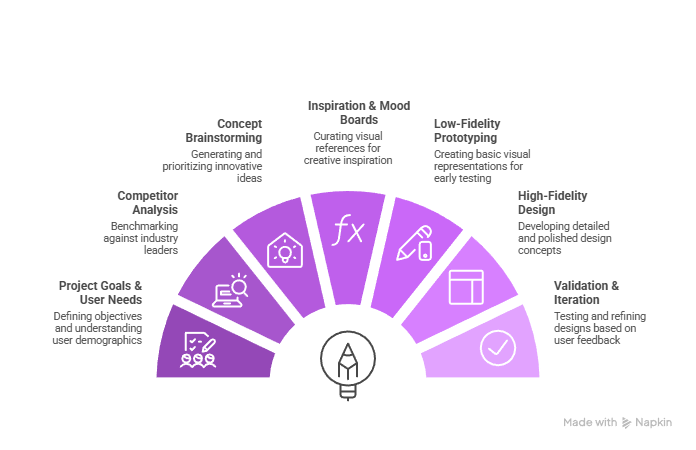
Step 1: Define Project Goals and User Needs
Start by immersing in the project’s DNA. Conduct stakeholder interviews to clarify objectives—e.g., “boost e-commerce conversions by 30%” or “streamline enterprise workflows.” Map user personas: demographics, behaviors, and pain points via surveys or analytics tools like Google Analytics.
Quick sketching shines here: jot user activities and interactions on paper or tools like Figma. Share preferences early—vibrant colors for youth apps or minimalist for finance. Output: A goals document with success metrics (e.g., <3-second load times).
Step 2: Competitor Analysis for Strategic Insights
Benchmark against top players. Audit 5-10 rivals using tools like Ahrefs or SimilarWeb: dissect UI patterns, feature successes, and failures. Note what resonates—e.g., swipe gestures in TikTok vs. clunky menus elsewhere.
Step 3: Brainstorm and Define Core Concepts
Verbalize ideas first: host workshops for “how might we” questions, generating 50+ raw thoughts. Use mind-mapping tools like Miro to cluster themes—e.g., “joyful efficiency” for a task app.
Prioritize via dot-voting: select 3-5 concepts. Document verbally: “Our app embodies ‘seamless discovery,’ prioritizing intuitive search over rigid categories.” This step cements originality.
Step 4: Seek Inspiration Without Copying
Combat blocks by curating references. Browse Dribbble, Behance, or Awwwards for trending UI/UX designs—focus on micro-animations or neumorphism. Read blogs like Smashing Magazine for evolving trends like AI-driven personalization.
Curate a mood board: 20-30 assets capturing essence, pinned in Pinterest or Milanote. Avoid direct replication; synthesize into unique hybrids.
Step 5: Visualize with Low-Fidelity Prototypes
Transition to visuals: sketch lo-fi wireframes on paper or Balsamiq. Outline screens, flows, and transitions—e.g., hamburger menus vs. bottom tabs for mobile.
Test early with 5 users via Maze or UsabilityHub for heatmaps and feedback. Iterate based on friction points, refining the concept’s skeleton before polishing.
Step 6: Develop High-Fidelity Design Concept
Elevate to hi-fi: choose palettes (e.g., Adobe Color for harmony), fonts (Google Fonts for readability), and layouts (grids via Figma). Ensure accessibility: 4.5:1 contrast ratios, alt text, keyboard navigation.
Pro tips:
- Limit to 3 primary colors; use 60-30-10 rule (dominant, secondary, accent).
- Typography: Pair sans-serif headings (e.g., Inter) with a readable body (e.g., Open Sans, 16px min).
- Patterns: Subtle gradients or cards for depth without clutter.
Prototype interactions in Figma or Framer for micro-animations that delight.
Step 7: Validate, Iterate, and Document
User test prototypes with 10-15 participants, measuring task success (90% goal) and NPS scores. Gather quantitative data (time-on-task) and qualitative insights (think-aloud sessions).
Finalize the concept deck: 10-15 slides with rationale, assets, and variants. Share via Notion or PDF for team handoff. Schedule check-ins to evolve it post-launch.
Integrating Stats: The Business Case for Concepts
Data validates this process. UX investments yield $100 ROI per $1 spent, with mature teams 2.6x more likely to succeed. Mobile UX lag drops conversions by 70%; optimized concepts fix this. In 2025, AI tools like Figma’s Dev Mode accelerate hi-fi by 40%, but human-led concepts remain key for empathy.
For SoftProdigy clients in AI, cloud, or fintech, concepts ensure compliant, scalable UIs—e.g., schema-optimized flows boosting SEO alongside UX.
Tools and Best Practices for Efficiency
Enhance your workflow:
- Research: Hotjar for heatmaps, SurveyMonkey for personas.
- Ideation: Miro, Whimsical for maps.
- Prototyping: Figma (collaborative), Adobe XD (advanced animations).
- Testing: UserTesting.com, Lookback.io.
Best practices:
- Mobile-first: Design for the smallest screens upward.
- Inclusive: Follow WCAG 2.2 for diverse users.
- Agile: Weekly sprints with concept reviews.
- Metrics-driven: Track CSAT, bounce rates pre/post-launch.
Common Pitfalls and How to Avoid Them
- Over-Design: Stick to 3 concepts max; kill darlings early.
- Ignoring Feedback: Test with real users, not teams.
- Trend-Chasing: Balance novelty with timeless usability.
- No Documentation: Always version-control concepts in shared repos.
Conclusion: Elevate Your Projects Today
The UI/UX design process, anchored by concept development, transforms vague ideas into market-winning products. Implement these steps for interfaces that captivate and convert. For tailored UI/UX expertise, partner with SoftProdigy—we deliver concept-to-launch excellence for global enterprises.